Table of contents
What's new
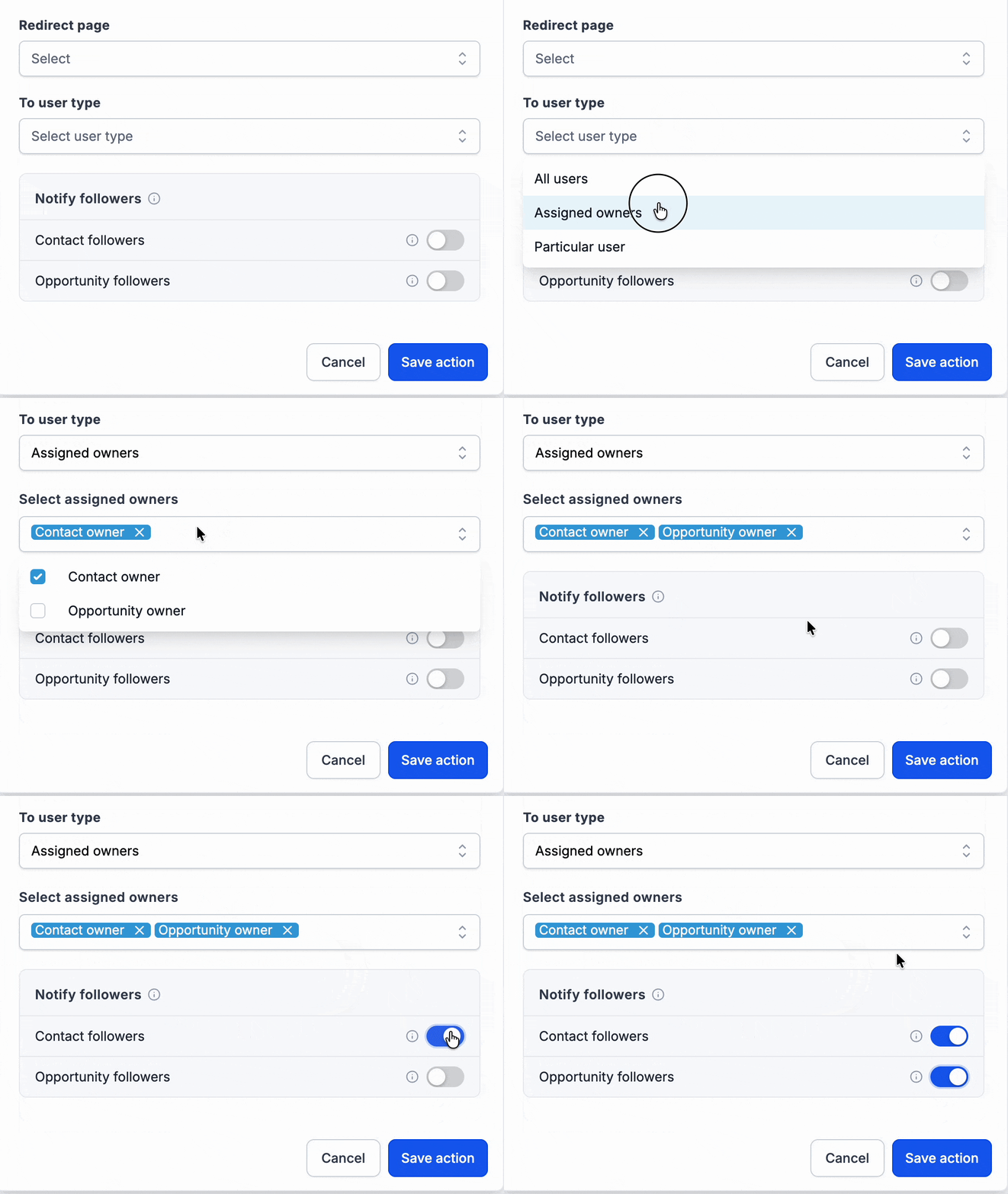
You can now notify the followers of a contact, the followers of an opportunity, or both, directly from the "Internal notification" workflow action. We have also added "Opportunity owner" as a new option among the recipients in the "User type" selector.
How it works
A new section for notifying followers appears immediately below the "To user of type" field. The follower tick boxes are cumulative: notifications are sent to the followers in addition to the recipient selected in the field above.
The system identifies followers at the moment the action runs and automatically removes any duplicate recipients.
How to use it
- Open an "Internal notification" action inside a workflow.
- Choose the recipient in the "To user of type" field.
- Switch on the options for contact followers, opportunity followers, or both.
Why it matters
Teams often collaborate on contacts and opportunities they are not directly responsible for. This feature simplifies communication and lets you keep every team member involved in the loop (lead generators, salespeople, consultants and the people handling renewals) with no need for manual mentions or extra workflow branches.
Practical examples
- An estate agency team sets "Assigned user" as the main recipient and switches on "Contact followers". That way, when the lead replies, a notification goes to the assigned agent as well as to the person who generated the contact and the financial adviser following that contact.
- A sales team covering for absent colleagues can switch on both "Contact followers" and "Opportunity followers". The stand-in colleague following the record then receives a notification whenever a form is submitted or an opportunity changes stage.
Additional notes
- Available for email, in-app notifications, SMS and WhatsApp. The contact follower and opportunity follower options are independent and can be used together.
- Duplicate recipients are removed automatically when the action runs.
- Opportunity followers are ignored if there is no associated opportunity or if it has been deleted. The main recipient you selected still receives the notification.
- Followers without a valid contact detail for the chosen channel (a phone number for SMS, for example) are skipped for that notification type.
- Internal notification actions already present in your workflows are unaffected.