



Table of contents
- Preference management
- What is preference management?
- Key benefits of preference management
- Compliance-driven communication
- Better email deliverability
- Personalised engagement
- Account-level customisation
- Preference types
- Linking preferences to campaigns
- Automatic audience filtering
- How to set up preference management
- Step 1: Create the preference types
- Step 2: Assign preferences to campaigns
- Managing preferences at contact level
- Frequently asked questions
Preference management
Give your contacts control over the types of marketing email they want to receive. Preference management lets every account create subscription categories, link them to campaigns and automatically honour unsubscribe requests at category level.
Important: once enabled, preference management is irreversible. Because it introduces account-level unsubscribe controls, this change cannot be undone after activation.
For new configurations, Futuria CRM does not add a default subscription type. You will need to create the categories that suit your email marketing programme. Category names can be edited after creation and support up to 100 characters.
What is preference management?
Preference management helps businesses stay compliant with regulations by respecting each contact's communication choices — both whether they want to receive email at all and which types of email they prefer. This reduces unwanted communication, minimises the risk of being reported as spam and supports better email deliverability.
With preference management, every account can create and manage custom communication categories (preferences) that align with its own marketing needs. These categories can be linked directly to campaigns, allowing the system to automatically honour the preferences declared by each contact.
When a contact unsubscribes from a specific preference type, any future campaign assigned to that category will exclude them automatically, even if they were part of the campaign's original audience. This ensures more relevant messaging, stronger compliance and a more personalised experience for every contact.
Key benefits of preference management
Compliance-driven communication
Automatically honour unsubscribe decisions at category level, so every send respects your contacts' choices.
Better email deliverability
Reduce spam complaints and unwanted messages, protecting your sender reputation over time.
Personalised engagement
Send content that is more relevant and in line with the preferences your contacts have declared: not everyone wants to receive every type of email.
Account-level customisation
Each account defines its own communication categories according to its specific marketing strategy.
Preference types
Preference types are the granular categories that form the foundation of preference management. You can create as many as you need to reflect the different themes in your email marketing programme (for example newsletters, promotions, event updates).
These categories live in Settings → Preference management hub and can be edited, disabled or deleted at any time.
Linking preferences to campaigns
Linking a campaign to a preference category tells the system "why" you are sending an email. This allows Futuria CRM to filter the audience according to your contacts' choices before delivery.
When a contact unsubscribes from a category, they are automatically excluded from current and future sends for that category, even if the contact is still present in your static list.
Automatic audience filtering
If a contact has unsubscribed from a specific preference type, they will automatically be excluded from any campaign assigned to that category, even if they were originally included in the campaign audience. This ensures accurate targeting and prevents unwanted emails from going out.
Once preferences are set, the system will:
- Automatically exclude conflicts: it will automatically remove contacts from campaigns that conflict with their declared preferences.
- Apply unsubscribes by category: it will honour category-level unsubscribes even if the contact appears in the campaign's original audience.
How to set up preference management
Step 1: Create the preference types
Preference types are the subscription categories used to label your email programmes, such as newsletters, promotions or event updates.
-
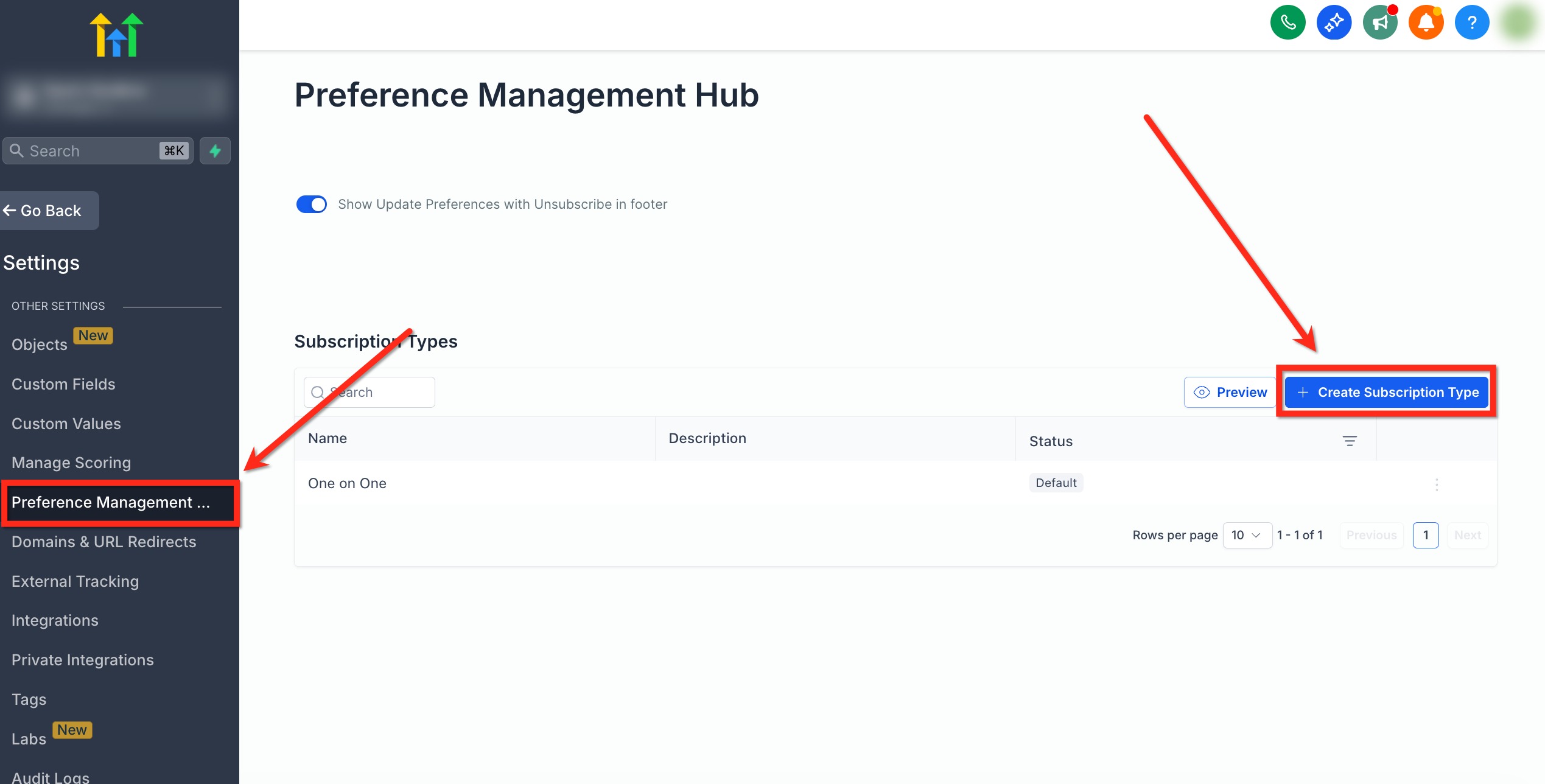
Go to the preference management hub
Navigate to Settings → Preference management hub at account level.
-
Create a subscription type
Click + Create subscription type.
-
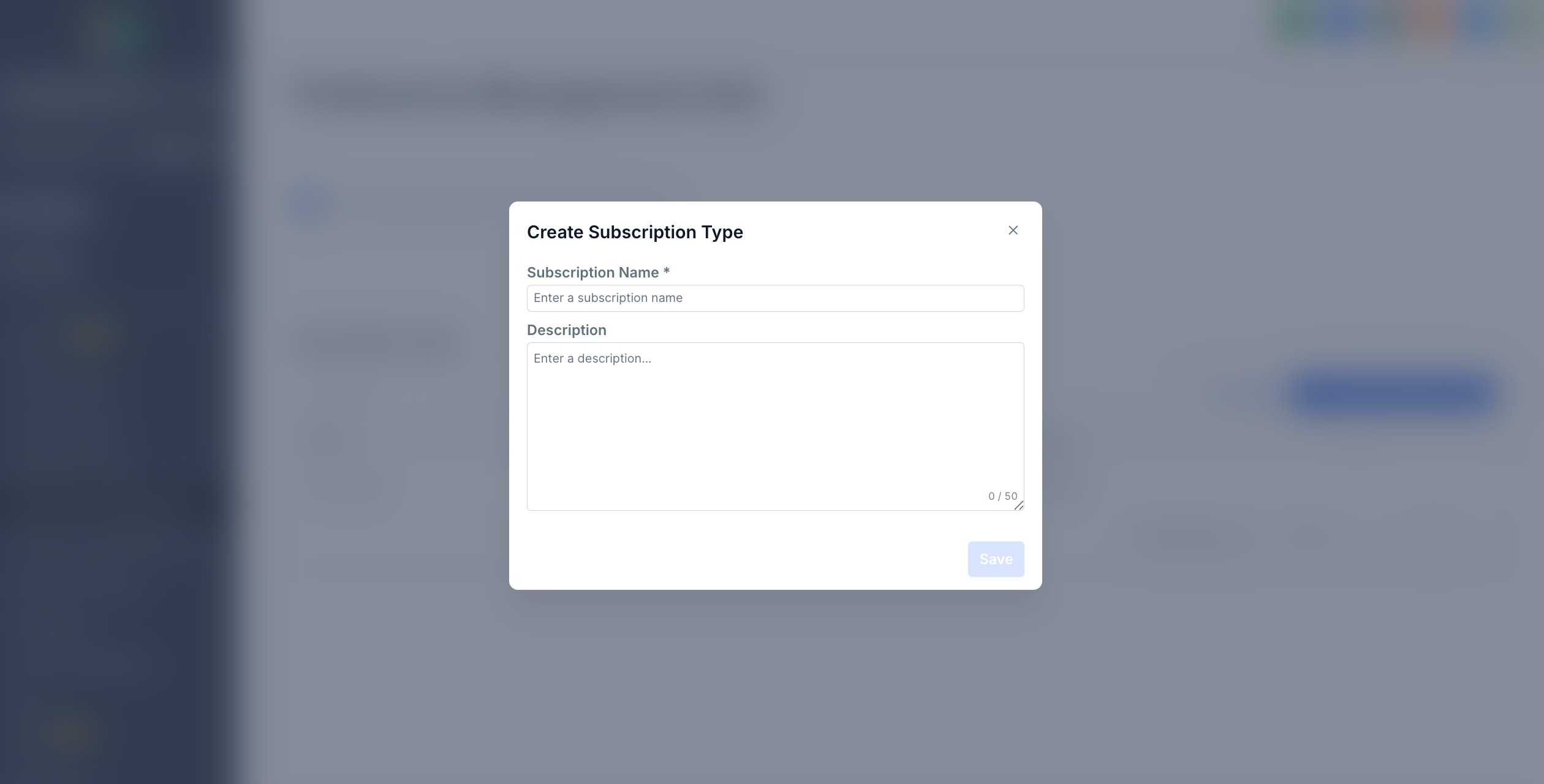
Enter the subscription name and description
Enter a Subscription name and a Description for the category you want to use.
-
Use a clear, descriptive name
Choose a name your recipients will understand. Subscription category names support up to 100 characters.
-
Save and confirm
Save your changes and confirm the action when prompted.
-
Repeat for each category
Repeat this process for every preference category you want to use.
Step 2: Assign preferences to campaigns
Assign a preference category to an email campaign directly from the email editor. This lets the system understand why the message is being sent and who should receive it.
-
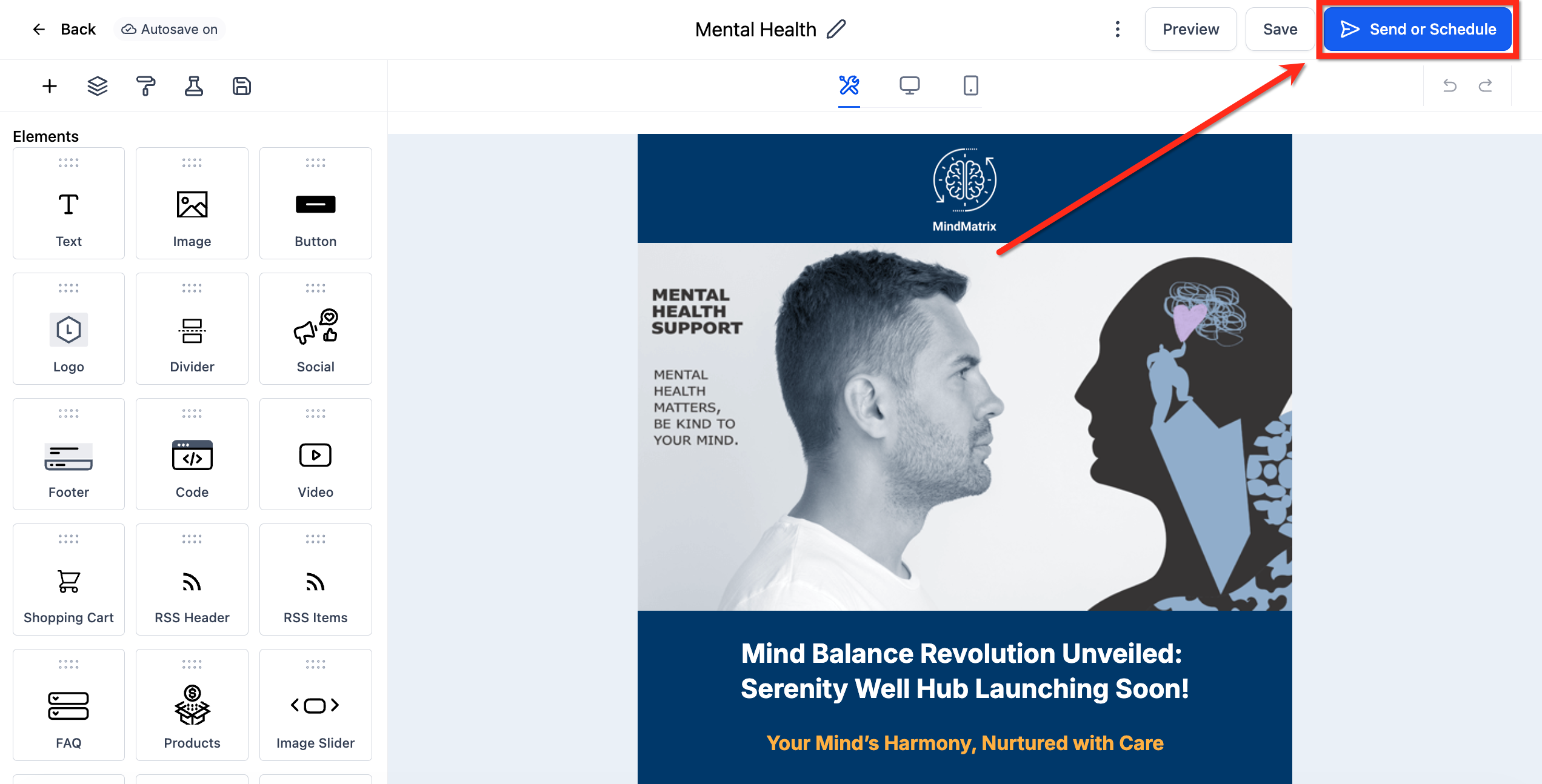
Open the email campaign
Open the email campaign you want to assign a subscription type to, then click Send or schedule.
-
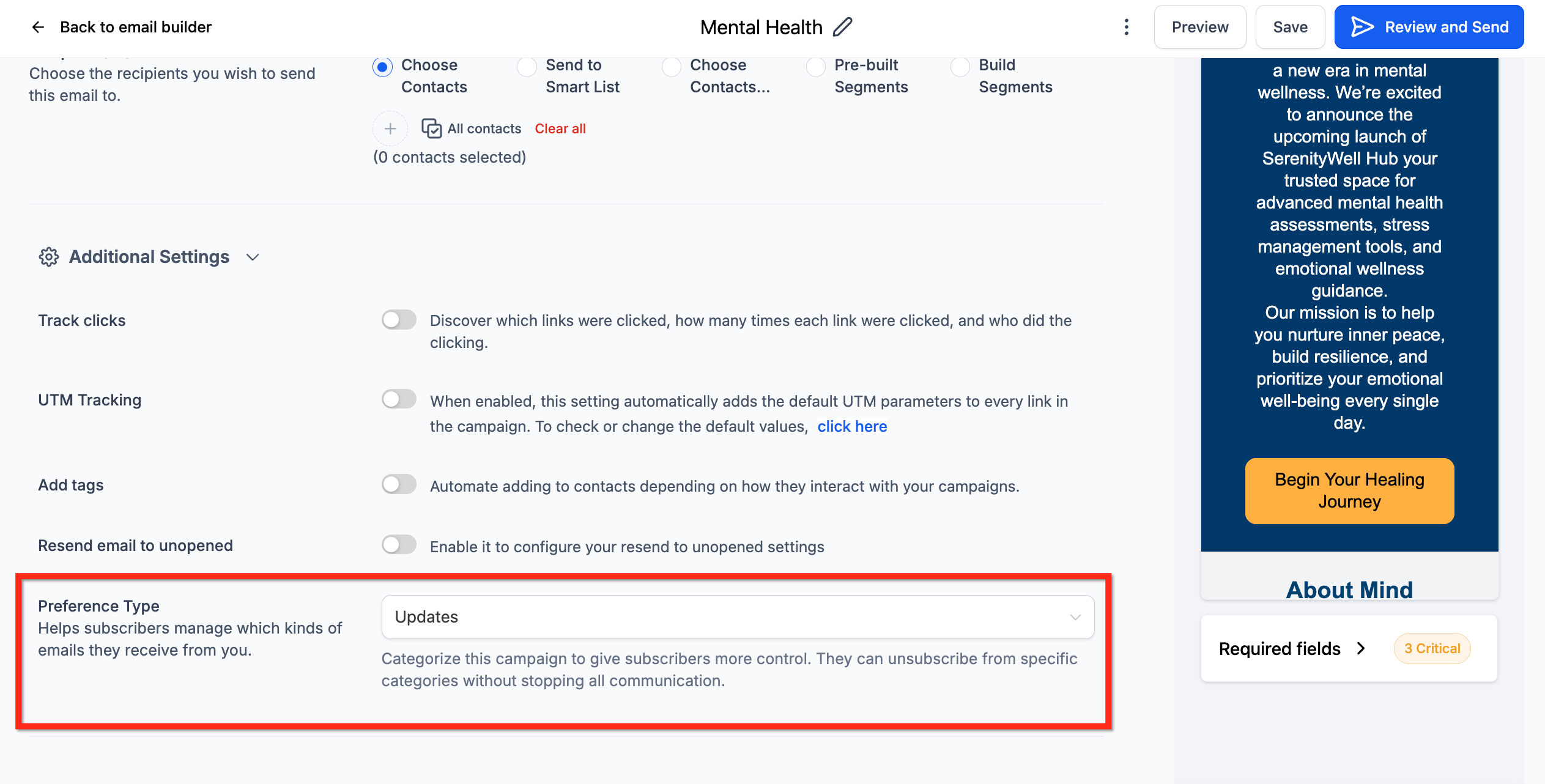
Select the preference type
Choose the Preference type you want using the drop-down menu.
Managing preferences at contact level
From the contact details page, teams can view or manually edit each contact's preferences for full transparency and control. To view or update a contact's preference settings, follow the steps below.
Note: when a preference status is updated at contact level, Futuria CRM records the update in Conversations, so that teams can review preference changes in context.
-
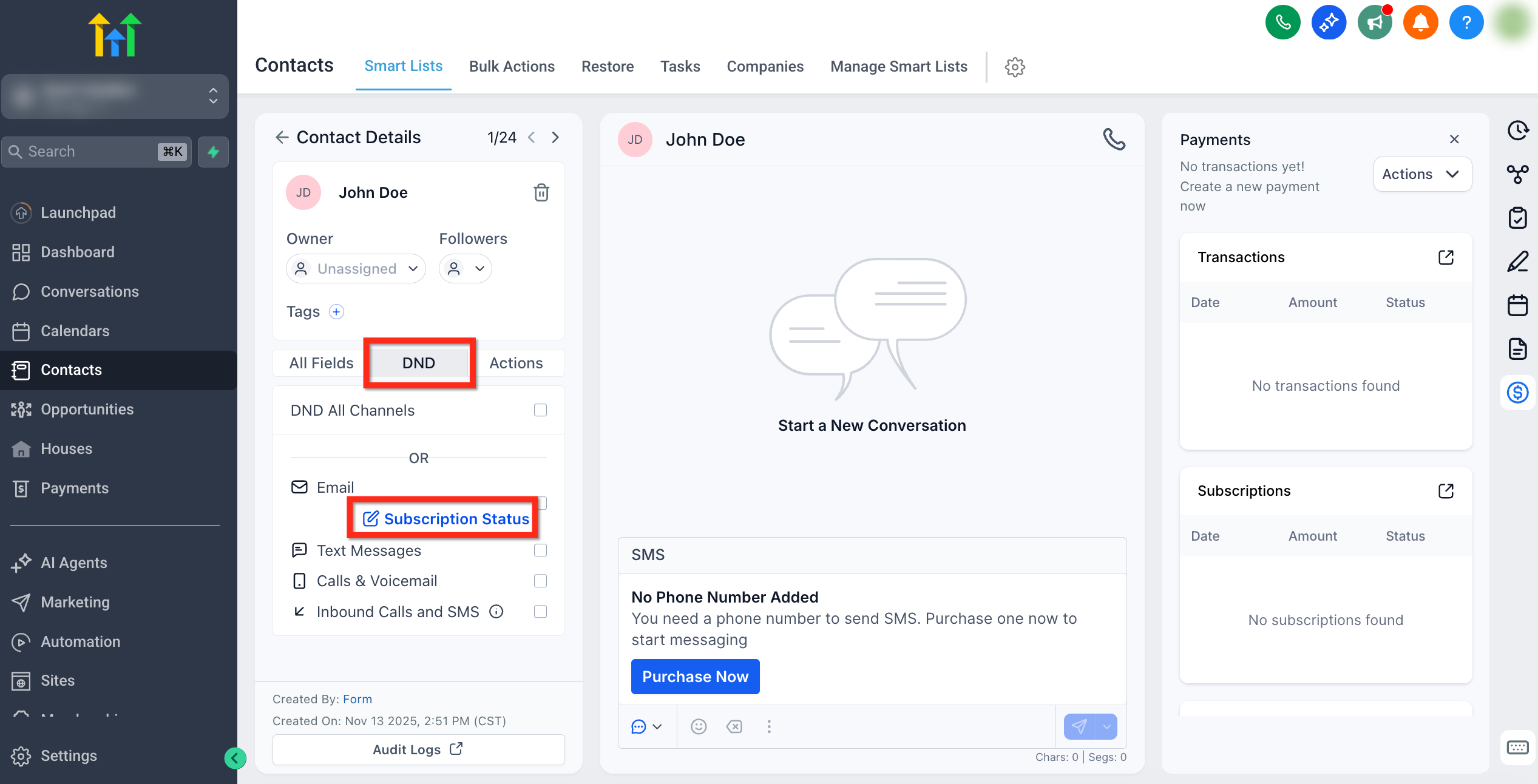
Open the contact's subscription status
Go to Contacts and select a contact. From the contact page, open the DND tab and click Subscription status.
-
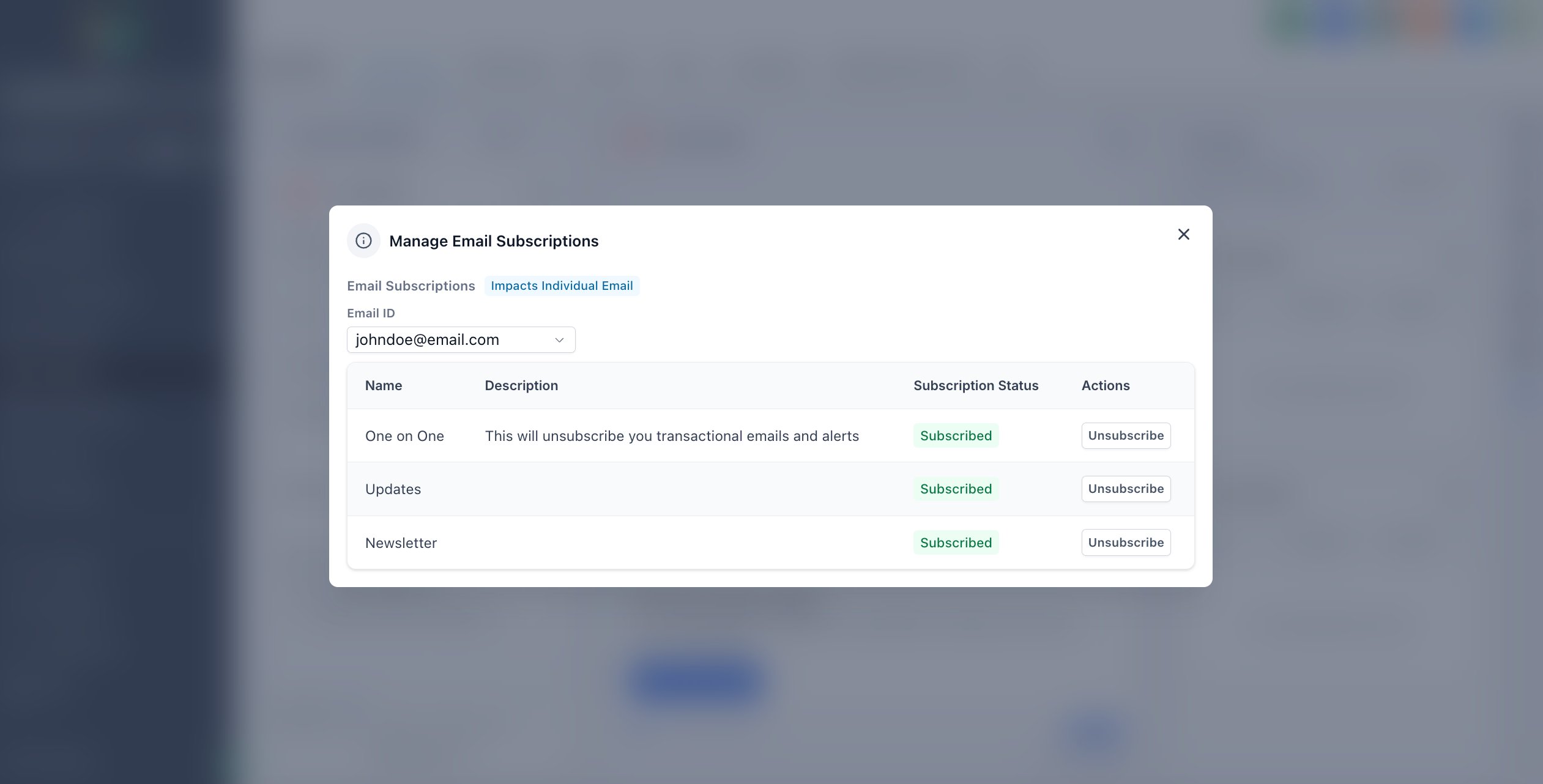
Set each preference type
In the Manage email subscriptions pop-up, set each preference type to Subscribed or Unsubscribed as appropriate.
-
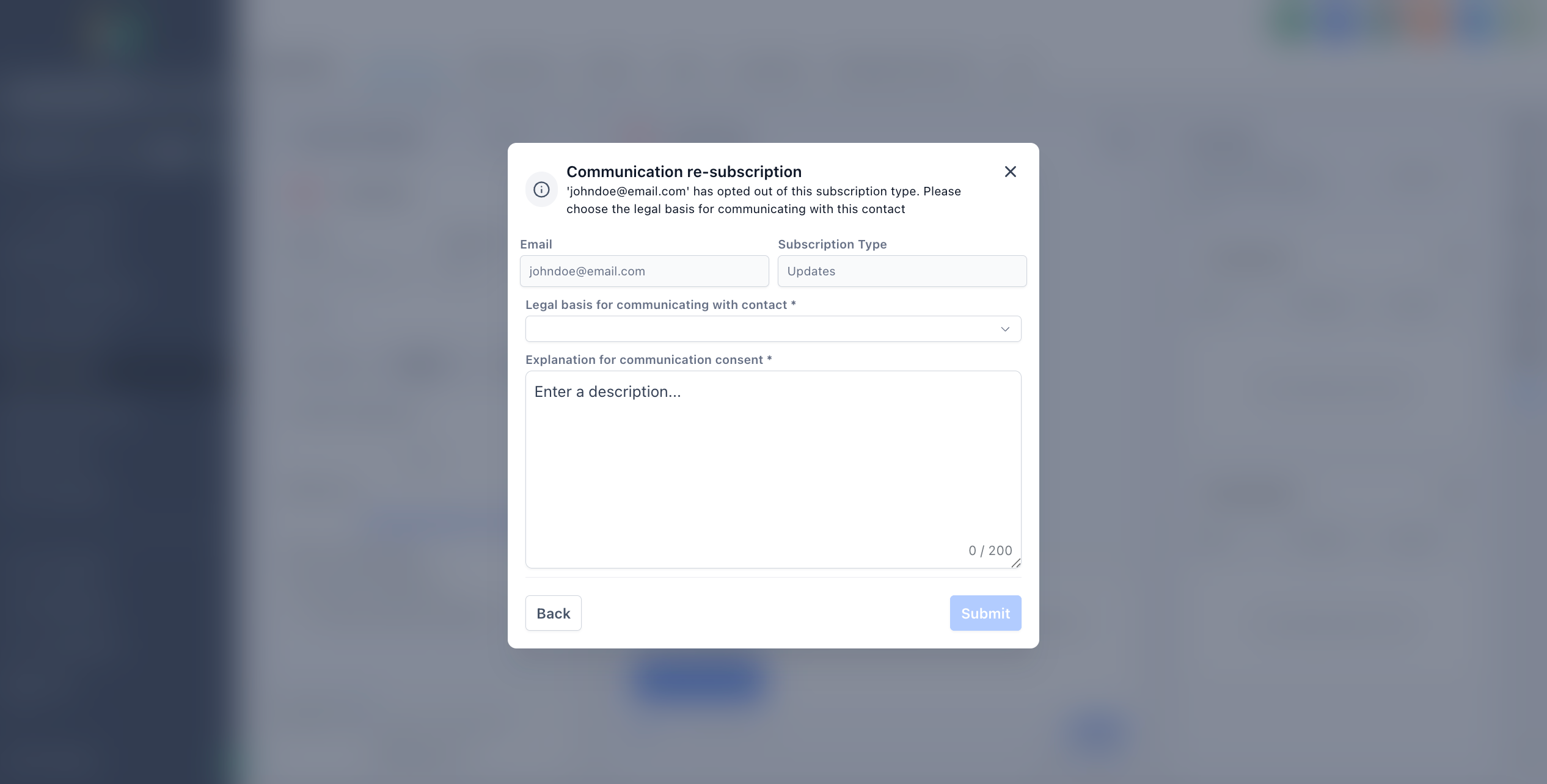
Provide a legal basis for re-subscribing
For any preference category marked as Unsubscribed, the account must provide a legal basis before the contact can be subscribed again.
Frequently asked questions
How does a category unsubscribe relate to a global unsubscribe?
A category unsubscribe suppresses only the selected topics. A global unsubscribe removes the user from all of the account's marketing emails.
Can contacts manage their own preferences?
Yes. When preference management is enabled, the unsubscribe link includes a "Manage your preferences" link where contacts can manage their category-level choices directly.
Do emails sent from workflows respect category preferences?
Yes. Automatic filtering removes contacts whose preferences conflict with the campaign categories, regardless of how they were added to the audience.
What happens if all preference types are archived?
When all preference types are archived, preference management shows a guided message instead of an empty view, prompting you to create or restore a category.
Can preference management be switched off after it has been enabled?
No. Preference management is irreversible once enabled.
Because it introduces account-level unsubscribe controls, activation cannot be undone. Only enable it when you are ready to commit to this approach.
Is there a limit to the number of preference types I can create?
You can create as many categories as your email programme requires. Subscription category names support up to 100 characters and can be edited after creation.