


Table of contents
- What is this feature?
- Risk categories
- Use cases
- How do you use this feature?
- Body of the email that will be sent (sample data):
- Risk Assessment tab
- FAQ
What is this feature?
Our innovative risk assessment feature is invaluable for your email marketing activities. It analyses your imported contact list, giving you a complete overview of email deliverability and potential risks.
More specifically, it uses our bulk verification technology to analyse your email list, sorting addresses into categories such as "deliverable", "undeliverable", "catch-all" and "unknown". It then breaks these categories down further by risk level: "high", "low", "medium" and "unknown". This granular view allows a clearer understanding of your contact list's deliverability prospects.
But it does not stop at providing data. It improves your email strategy by helping to reduce your bounce rate and avoid unnecessary blocks on your sending capabilities. It also prompts anyone who is not using the email verification feature to enable it, further improving the overall success rate of your campaigns.
In short, this feature is your strategic partner for optimising the deliverability and effectiveness of your email marketing campaigns, helping you reach your audience more consistently and efficiently.
Risk categories
| Risk categories | Description |
|---|---|
| High | Email addresses in this category have a high probability of being undeliverable. This could be down to several reasons, such as a non-existent email account, a domain with no MX record or a full recipient mailbox. |
| Medium | Email addresses in this category may or may not be deliverable. This can happen because the mail server responded ambiguously, the domain was identified as "catch-all" or the email address was randomly generated. |
| Low | Email addresses in this category are likely to be deliverable. This indicates that the server responded positively to the verification request and that the email address appears correctly structured and associated with a legitimate domain. |
| Unknown | Email addresses in this category could not be verified because of unexpected errors or temporary problems with the recipient's mail server. The deliverability of these emails remains uncertain unless they are verified again at a later date. |
Use cases
Bulk email verification is a powerful tool for businesses and organisations of every size, used in a range of practical scenarios. Here are some examples:
Email marketing campaigns: Businesses regularly send email marketing campaigns, such as newsletters, promotional emails or updates. Using an unverified email list can lead to a high bounce rate, negatively affecting sender reputation and deliverability. Bulk verification helps to clean lists and ensure that messages reach the intended audience.
User registration verification: When users sign up for a service, they often provide an email address. They may make a typing error, use a non-existent address or supply a fake one. Bulk verification can help confirm that these emails are valid before adding them to the database, ensuring effective communication.
CRM data cleaning: Over time, email addresses in a CRM system can become out of date. People change jobs, change email address or abandon old accounts. Verifying these addresses in bulk on a regular basis keeps your CRM data current.
E-commerce platforms: Online retailers need to communicate with customers about orders, shipments and other matters. Bulk email verification ensures that transactional emails (such as order confirmations) and marketing emails reach customers' inboxes.
How do you use this feature?
When you import a CSV file into the CRM, if your account uses the Futuria CRM email sending system and you have not enabled the individual email verification feature, the imported CSV file will be analysed automatically. A pop-up will then be shown and an email sent to the account's team members with the risk analysis of the email addresses in the imported file. The email and the pop-up will encourage users to enable email verification.
Body of the email that will be sent (sample data):
Subject: Risk analysis for your email contact list
Hello [Account Name],
We have analysed your latest contact import and found the following regarding the email addresses:
Deliverable: 71.84%
High Risk: 17.81%
Turning on native email verification can eliminate potential risks, making sure you do not send messages to invalid email addresses. Once it is active, the system will not attempt to send to any email address flagged as invalid.
Link to the support article: [link to the support article here].
If you have further questions or need help managing your email list, do not hesitate to contact our support team. We are here to help!
Kind regards,
The Futuria CRM team
Risk Assessment tab
The Risk Assessment tab under Settings > Email Services > Risk Assessment keeps track of historical import data relating to the risk assessment of email addresses.
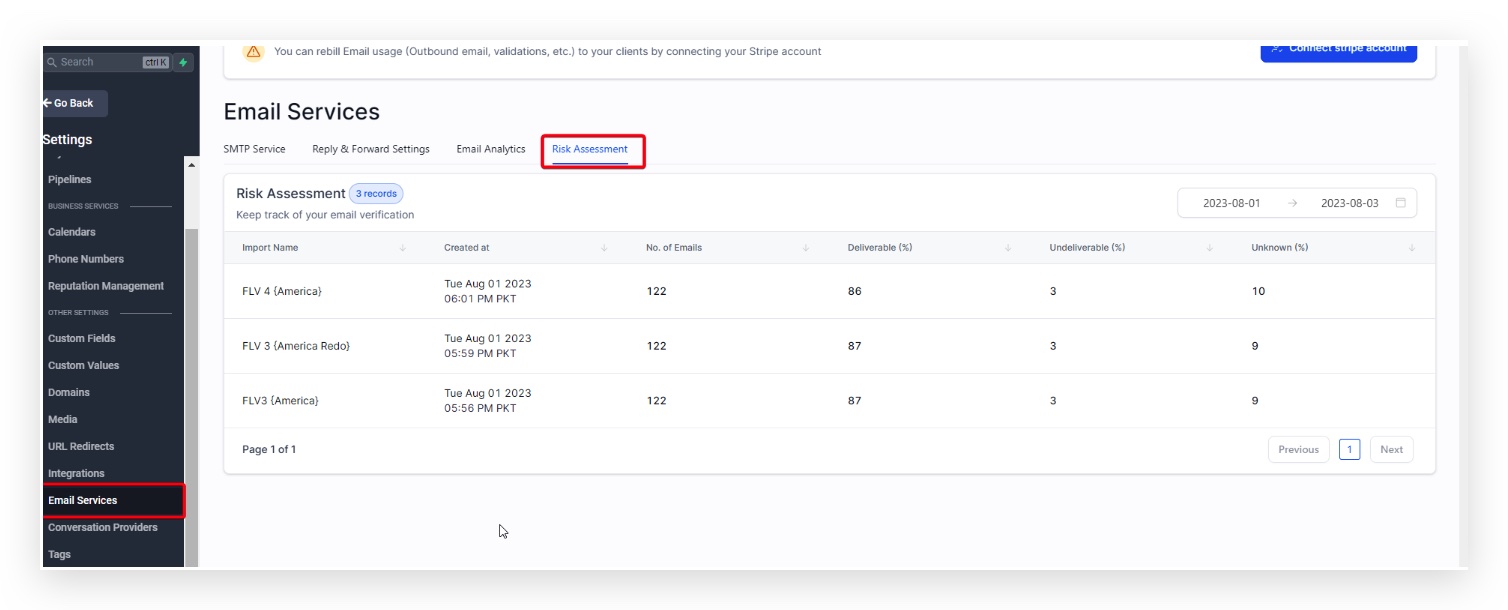
The Risk Assessment tab gives you a complete overview of your email verifications and their results. Here is a description of the user interface:
Records: Shows how many bulk email verification records or jobs are displayed.
Date range: The date range at the top indicates the period covered by the email verification records shown.
Import Name: This column lists the name of each email verification job. It takes the name of the bulk import action from Bulk Actions. Each name should be unique, as it helps to identify and track the relevant job.
Created on: This column shows the exact date and time each job was created.
No. of Emails: This column shows the total number of email addresses included in each job for verification.
Deliverable (%): This column indicates the percentage of email addresses in the job that were verified and found to be deliverable or valid.
Undeliverable (%): This column shows the percentage of email addresses in the job that were verified and found to be undeliverable or invalid.
Unknown (%): This column shows the percentage of email addresses in the job that could not be conclusively verified, meaning their deliverability status remains unknown.
Pagination: The "Page 1 of 1" indication at the bottom shows that you are on the first page of results. If there were more records than can be displayed on one page, you would use these controls to move between pages.
FAQ
What does the Deliverable percentage mean in the Risk Assessment tab?
The Deliverable percentage indicates the proportion of email addresses that, in a given job, were verified and found to be valid and reachable. This percentage is calculated by dividing the number of deliverable email addresses by the total number of email addresses in the job, and multiplying the result by 100.
How is the Undeliverable percentage calculated in the Risk Assessment tab?
The Undeliverable percentage represents the proportion of email addresses in a specific job that were verified and found to be invalid or unreachable. This percentage is determined by dividing the number of undeliverable email addresses by the total number of email addresses in the job, and multiplying the result by 100.
What does the Unknown percentage mean in the Risk Assessment tab?
The Unknown percentage shows the proportion of email addresses in a particular job that could not be definitively verified. This means their deliverability status is unclear. It is calculated by dividing the number of emails with unknown status by the total number of emails in the job, and multiplying the result by 100.
What is the "Import Name" in the Risk Assessment tab?
The "Import Name" is a unique identifier for each job or batch of email addresses you submit for verification. It lets you track and manage each job separately.
Why might the date and time in the "Created on" column matter?
The date and time information in the "Created on" column helps you understand when each email verification job was started. This can be particularly useful for tracking progress over time or determining the order in which jobs were run.
Why are not all emails verified?
Not all email addresses can be verified, for various reasons such as server restrictions, privacy settings or network problems. These email addresses are classified as "Unknown".
What happens if the mail server does not respond in time?
If the mail server does not respond promptly, the verification system may classify the email address as "Unknown". The system was unable to determine whether the email address is deliverable or not.
What should I do if I see many "Unknown" email addresses in my list?
A large number of "Unknown" results may suggest server problems or other technical issues. You might consider running the verification job again at a later time.
If the problem persists, contact support. The formatting of the email address or of the CSV file could also be a problem.
What should the next step be after receiving the Risk Assessment report?
After receiving the report, you should consider removing or re-checking the "Undeliverable" and "Unknown" email addresses in your list before starting any email campaign. This can help improve your deliverability rate and the overall effectiveness of your campaign.
What does "No. of Emails" mean in the Risk Assessment tab?
The "No. of Emails" represents the total count of email addresses included in a particular batch or job for verification. This gives you an idea of the scale of the email verification job.
Why do different jobs/batches have different percentages of Deliverable, Undeliverable and Unknown?
Different jobs or batches can have varying percentages because of the quality of the email addresses in each batch. For example, a batch containing older or out-of-date email addresses may have a higher Undeliverable percentage than a batch with recently collected addresses.
What can I do to improve my deliverability percentage?
To improve deliverability, you can collect email addresses through reliable sources, update your email lists regularly and use double opt-in methods to make sure the addresses belong to people genuinely interested in receiving your communications.
Why are some emails classified as Deliverable but still bounce?
Deliverable emails can still bounce if the recipient's mailbox is full, the mail server is temporarily unavailable or the email is flagged as Spam by the recipient's mail service.
Can I run email verification again for a specific batch?
Yes, you can run email verification again for a specific batch. This can be particularly useful when a significant percentage of emails has been flagged as Unknown, which may be down to temporary server problems.
How often should I verify my email lists?
How often you verify your email lists can depend on various factors such as list growth, bounce rates and so on. However, it is good practice to verify your email list before every major email campaign.
How does the email verification process affect my overall email marketing strategy?
Email verification is crucial for maintaining a healthy email marketing strategy. It helps you remove invalid or undeliverable emails, thereby improving your deliverability rate, protecting your sender reputation and increasing the effectiveness of your email campaigns.
Does the verification process respect user privacy?
Yes, the email verification process respects user privacy. It does not involve accessing the content of any email; it simply checks whether an email address is valid and able to receive messages.
Is the email verification process secure?
Yes, the email verification process is designed to be secure. The data you submit for verification is generally processed over secure connections, and the resulting information is handled in line with the service provider's data handling and privacy policies.