


Table of contents
- What is comment management?
- Key benefits of comment management
- What you can do with comment management
- Replying to comments
- Liking comments
- Replying to nested comments
- Smart filters (Most recent vs Top)
- Using mentions in comment replies
- How to use comment management
- Feature overview by platform
- TikTok
- Community
- Bluesky
- Frequently asked questions
What is comment management?
Comment management in the Social Planner helps you view and reply to the comments on your posts, all from a single dashboard. Instead of switching between social platforms, you can now manage conversations directly from where you plan your content.
Note: at present, only comments on posts published through the Social Planner are supported. Comments on posts published natively (directly on Facebook, Instagram, LinkedIn, TikTok, Community, and so on) will not appear here. Support for other social platforms is in development.
Key benefits of comment management
- Unified inbox: view every comment next to your scheduled posts.
- Real-time engagement: keep engagement consistent by liking and replying to comments.
- Conversation context: handle deeper discussions with nested replies (threads).
- Time saving: save time by replying without leaving the Social Planner.
What you can do with comment management
These features simplify day-to-day engagement, letting you reply faster, keep conversations organised and highlight the highest-value interactions without leaving Futuria CRM.
Replying to comments
Reply to any top-level comment directly from the Social Planner, keeping author names, emoji and GIFs for an authentic experience. Fast, on-brand replies strengthen relationships and can generate further engagement or direct messages.
Liking comments
A quick like lets your followers know you have seen and appreciated their contribution. Every like is recorded on Facebook and counts towards the post's engagement metrics, further improving its visibility.
Replying to nested comments
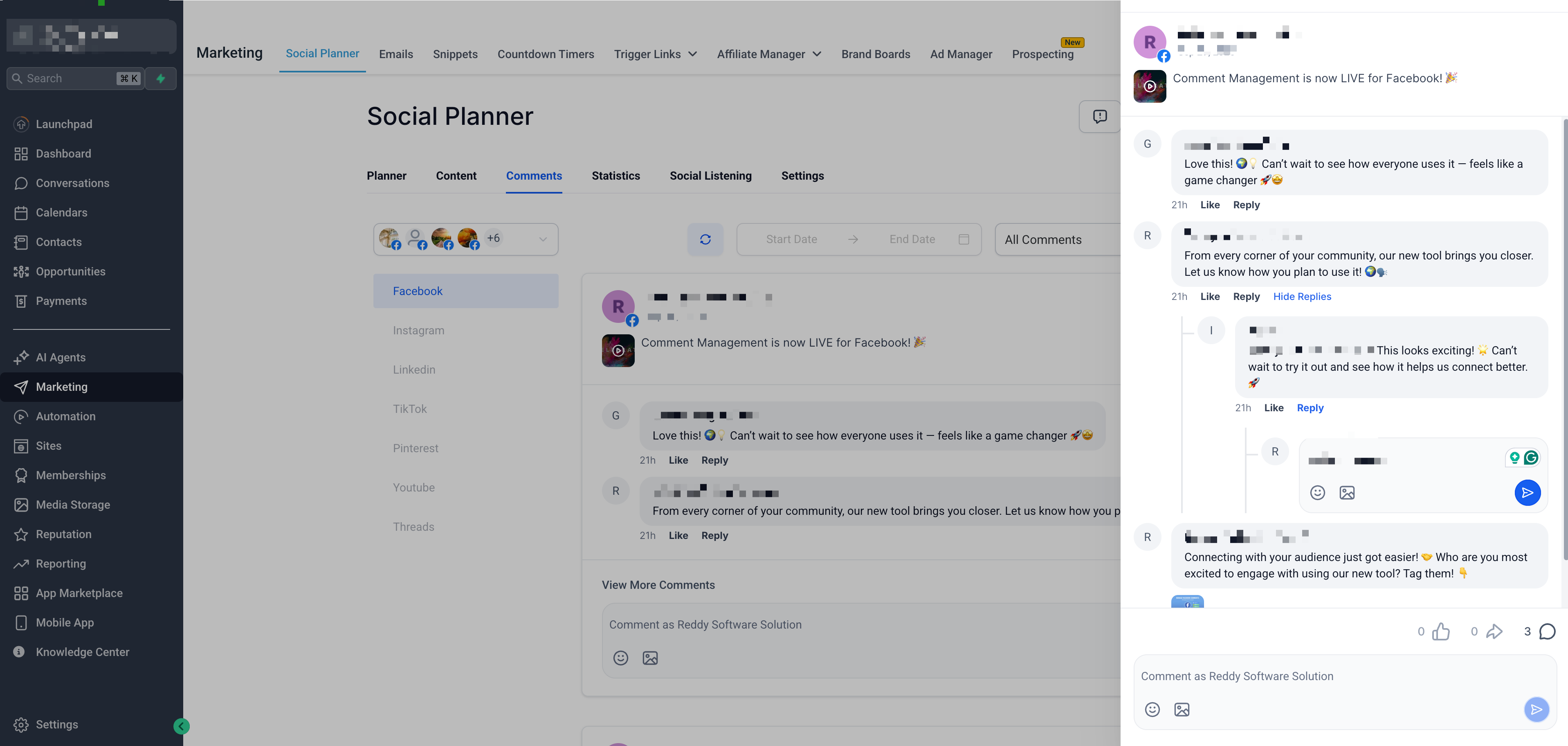
Nested replies (threads) keep conversations between several people organised. Click the arrow next to a top-level comment to view and reply to the sub-threads, so that your replies appear exactly where the discussion is taking place.
Smart filters (Most recent vs Top)
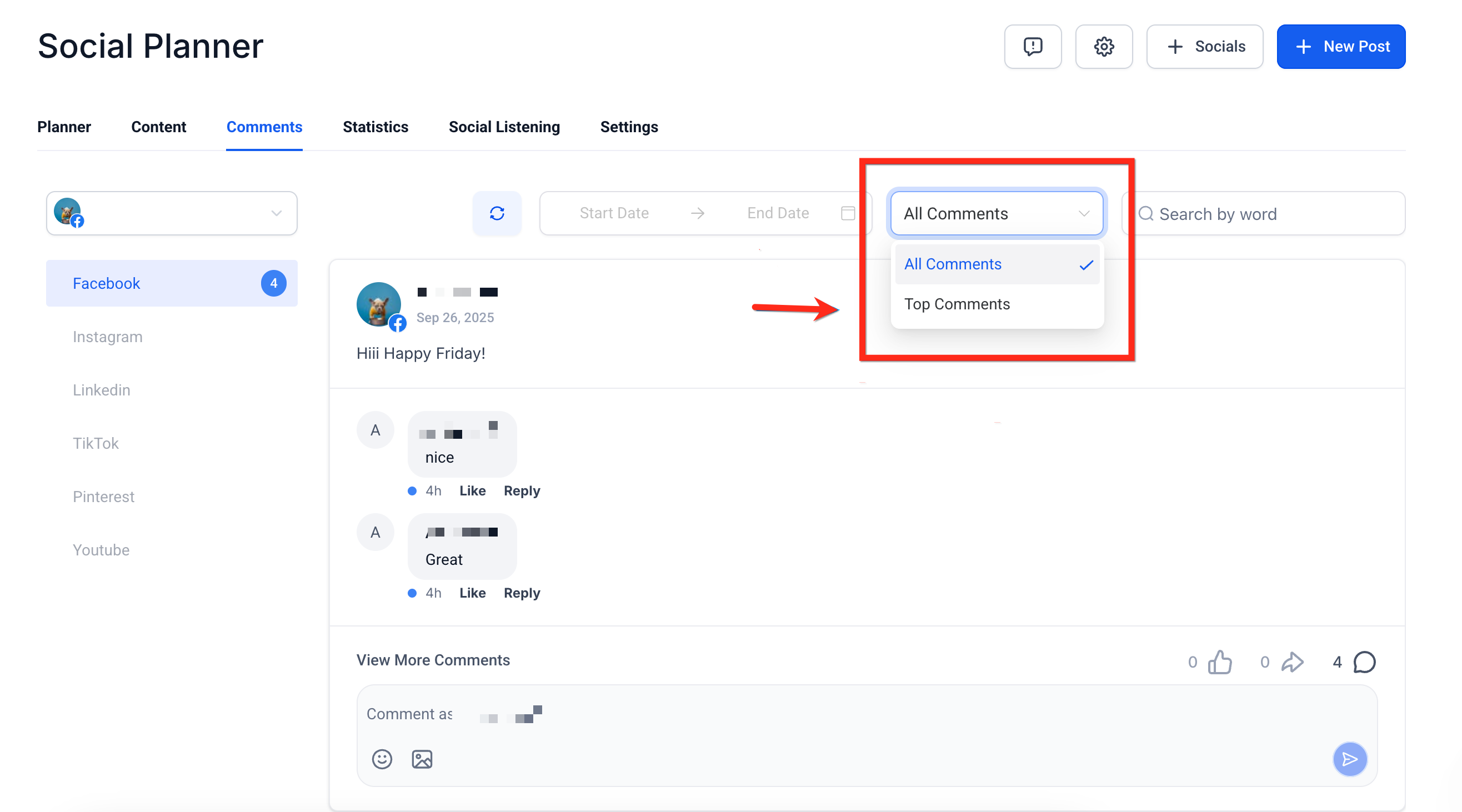
Use the drop-down menu above the inbox to change the view:
- Most recent: shows the latest activity so you never miss new questions.
- Top: sorts by Facebook's "most relevant" criteria, showing the comments with the most engagement first.
Using mentions in comment replies
Tag Facebook Pages or public profiles by typing "@" followed by at least three characters. A list of matching public pages will appear, letting you credit partners or acknowledge customers without leaving Futuria CRM.
How to use comment management
Step 1: Open comments in the Social Planner
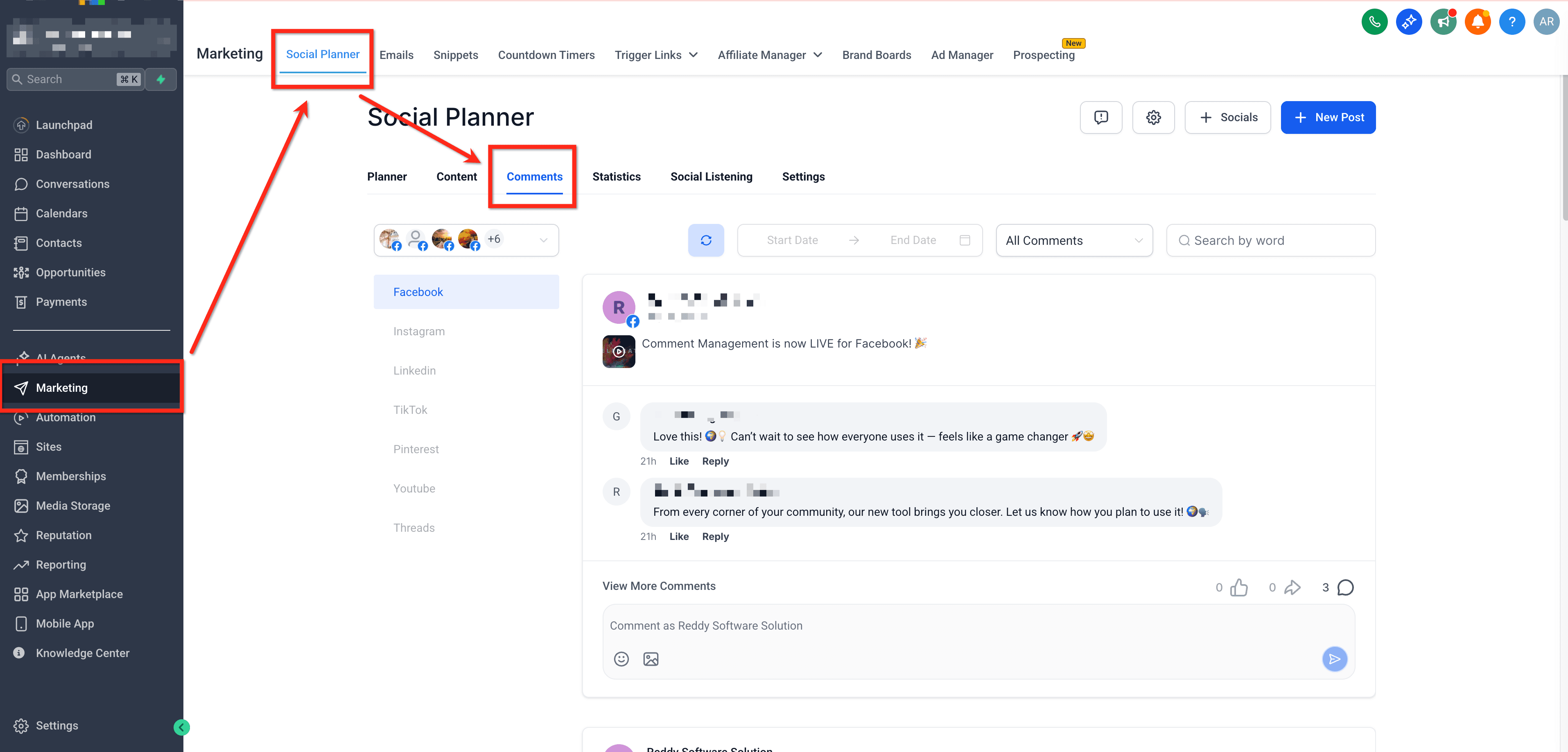
Go to Marketing → Social Planner → Comments.
Step 2: View and engage with comments
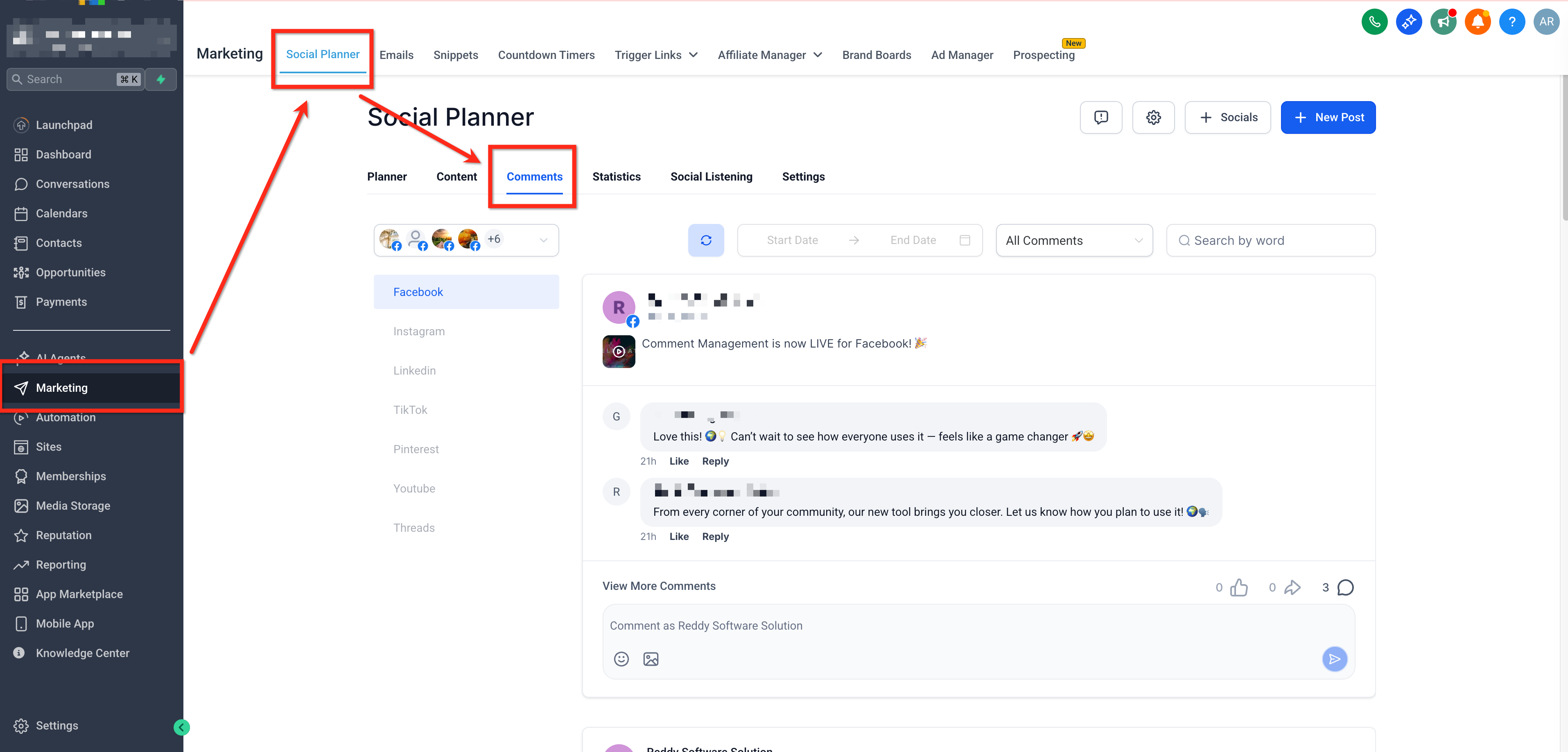
Here you can:
- Read comments on posts published through the Social Planner.
- Reply directly to users.
- Like comments.
- Add emoji and images to your replies.
- Reply to nested comments (threads) for deeper discussions.
Click View more for an expanded view of the comments.
Step 3: Filter between most recent and top comments
Use the drop-down filter to choose how comments are displayed:
- Most recent → Shows the most recent comments first.
- Top → Highlights the most engaging or relevant comments.
Feature overview by platform
Comment management inside the Social Planner now supports Facebook, Instagram, TikTok and LinkedIn, with more platforms on the way.
- View comments on posts published through the Social Planner.
- Reply to comments using text, emoji and images (up to 10 MB).
- Support for multi-level nested replies (threads).
- Like comments.
- Mentions supported using "@" + a minimum of 3 characters for the search.
- Filter comments by Most recent or Top.
- Emoji support available in replies.
- Image upload supported (up to 10 MB, in line with Facebook's limits).
- Search within comments (minimum 3 characters).
- The Hide/Delete options are not supported.
- Media in comments (GIFs, previews) is visible but not clickable.
- Only comments on posts published through the Social Planner are supported.
Limitations:
- The count of nested comments is not displayed (only the count of top-level comments appears).
- Previews, images, videos and GIFs in comments are not clickable.
- The options to add GIFs, stickers or avatars in replies are not supported.
- Uploading images larger than 10 MB is not supported (Facebook API limit).
- Search requires a minimum of 3 characters.
- Comments on posts published natively on Facebook will not appear.
- The Hide/Delete actions are not supported.
- View comments on posts published through the Social Planner.
- Reply to comments using text, emoji and images (up to 10 MB).
- Support for nested replies.
- Like comments.
- Mentions supported only by typing the exact @username (search is not available).
- Filter comments by Most recent or Top.
- Emoji support available in replies.
- Image upload supported (up to 10 MB, in line with Instagram's limits).
- Search within comments (minimum 3 characters).
- The Hide/Delete options are not supported.
- Media in comments is visible but not clickable.
- Only comments on posts published through the Social Planner are supported.
Limitations:
- Mentions do not support search; users have to type the exact @username (Instagram API limitation).
- Previews, images, videos and GIFs in comments are not clickable.
- Uploading images larger than 10 MB is not supported.
- Search requires a minimum of 3 characters.
- The Hide/Delete actions are not supported.
- Comments on posts published natively on Instagram will not appear.
- View comments on LinkedIn Page posts published through the Social Planner.
- Reply to comments using text and emoji.
- Support for one level of nested replies.
- Like comments.
- Mention other LinkedIn users by searching for their usernames.
- Filter comments in the same way as Facebook and Instagram (Most recent, Top).
- Search within comments (minimum 3 characters).
- View all comments in the unified inbox.
- Supports LinkedIn Page posts published through the Social Planner.
Limitations:
- Only LinkedIn Pages are supported; personal profiles cannot be connected (API restriction).
- Nested replies are limited to one level.
- Uploading images in replies is not supported.
- Previews, images, GIFs and videos in comments are not clickable.
- Comments on posts published natively on LinkedIn do not appear in the Social Planner.
- The Hide/Delete comment actions are not supported.
- Search requires a minimum of 3 characters.
- Replies must respect LinkedIn's 3000 character limit.
TikTok
- View comments on posts published through the Social Planner.
- Reply to comments using text and emoji.
- Support for one level of nested replies.
- View all comments in the unified inbox.
Limitations:
- Comment management is supported only for TikTok Business profiles.
- The maximum comment length is 150 characters.
- Media attachments are not supported in replies.
- Users can only reply to one level of nested comments.
Community
- View comments on community posts directly in the Social Planner.
- Reply to comments using text.
- Support for one level of nested replies.
- View all comments in the unified inbox.
- Mention community members using "@" in replies.
- Real-time synchronisation with the native platform for the latest updates.
Limitations:
- Attachments are not supported in replies.
- Course and event mentions are not supported.
- Editing comments is not available inside the Social Planner.
- The maximum comment length is 8000 characters.
- Users can only reply to one level of nested comments.
Bluesky
- View comments on Bluesky posts published through the Social Planner.
- Reply to comments using text and emoji.
- Support for nested replies (up to 3 visible levels).
Limitations:
- Replies are limited to 300 characters.
- Only text and emoji are supported (no media attachments).
- Tagging profiles is not supported.
- Replies are visible up to 3 levels deep.
- Comments are synchronised only for the last 15 posts.
- Synchronisation runs every 6 hours (4 times a day).
Frequently asked questions
Can I see comments from other platforms?
Not yet. At present, only comments from Facebook, Instagram, TikTok, Community, Bluesky and LinkedIn are supported. More platforms will be available shortly.
Will I see comments on posts published directly from the native platform?
No. Only comments on posts published through the Social Planner will appear.
Can I delete or hide comments?
Not at the moment, you can only like or reply.
Can I reply with images and emoji?
Yes, we support replies with emoji. Image use depends on the platform.